Belle Robe — a women’s clothing catalogue built with React
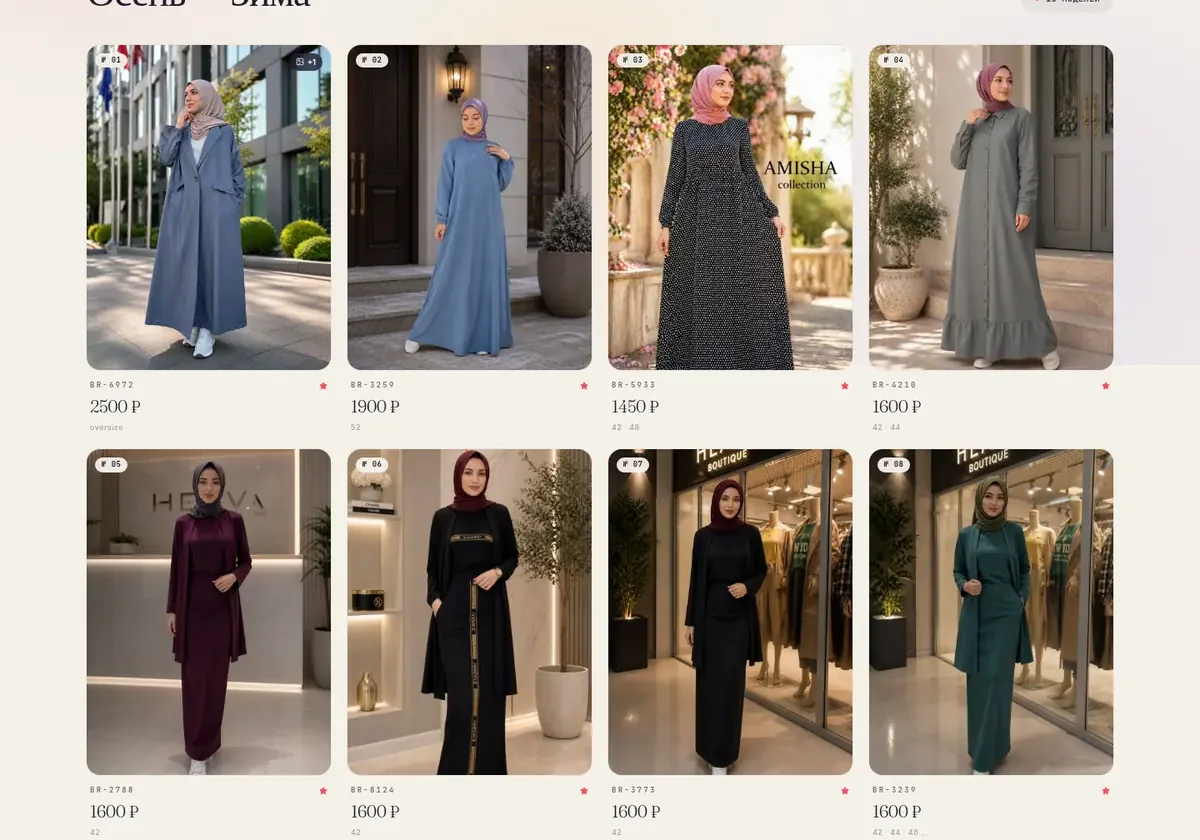
A clean clothing catalogue: large photos, collections, product codes, sizes and prices — and nothing extra between the garment and the decision to buy it. Built with React and Tailwind, with a modern design free of template tricks, and with an admin panel in which the owner runs the range herself.
The project is public: hadija.store — open it and see for yourself.
How it looks


What the product does
- A clean storefront: photo, product code, price, sizes — and nothing extra
- Five collections, with switching between them without a page reload
- Several photos per item, with a quick view
- Photos are converted to WebP right on upload through the admin panel
- Lazy loading of images, with space reserved for them: the grid does not jump
- An admin panel: add a product, edit it, remove it — without a developer
- A large grid designed for the phone first
A clean catalogue and a fresh design
In clothing the image decides, so the whole layout serves it: a large grid, air between the cards, a minimum of captions. Everything needed for the decision fits into three lines — product code, price, sizes — and the photo does the rest.
The design was built from scratch rather than taken as a ready theme: its own typography, its own grid, careful hover states and transitions between collections. The interface is written in React and styled with Tailwind, so it looks the same on every screen, and a new collection does not require new layout work.
Images: WebP on upload and lazy loading
A clothing catalogue means dozens of large photos, and without processing it would open on a phone indecently slowly. That is why conversion is built into the upload itself: a picture added through the admin panel immediately turns into WebP and is compressed to a reasonable weight. The owner does not have to prepare anything in advance — she can upload exactly what came from the photo shoot.
On the storefront the images load as you scroll, and the space for each is reserved before it arrives: the grid does not twitch or jump under your finger. Altogether the storefront opens fast even on a mobile network.
The admin panel: products under full control
The range is run by the owner, not by us. In the admin panel a product is added, edited and removed as a whole: photos, product code, price, available sizes, collection. An item has sold out — remove it; a new one has arrived — add it; the price has changed — correct it; all of this shows on the storefront at once, without a deployment or a developer.
The admin interface is deliberately simple: there are exactly as many fields as a garment has, and not one technical field. This matters more than it seems — a catalogue makes sense only as long as it is up to date, and it stays up to date only where updating it is neither scary nor slow.
How it is built
- 1 Interface React and Tailwind: components instead of pages, switching between collections without a reload
- 2 Upload A photo uploaded through the admin panel is immediately converted to WebP and compressed
- 3 Storefront A large grid with lazy loading: a picture arrives when you scroll to it
- 4 Product card Product code, price, sizes and several shots per model — everything needed for the decision
- 5 Order From the product card straight to a chat, where the order is placed
What it is built with
Need something similar?
Tell us what is happening on your side now. Scoping and the estimate are free and commit you to nothing.