LexIDE — a legal practice workspace with local AI
A legal practice means dozens of cases at once, hundreds of documents and deadlines whose loss costs more than any mistake in a text. We built a system that organises all of this information conveniently, while the built-in AI helps to process it and speeds the work up.
How it looks inside
The interface is shown with demo data: we do not publish real cases, calls or client records.



What the product does
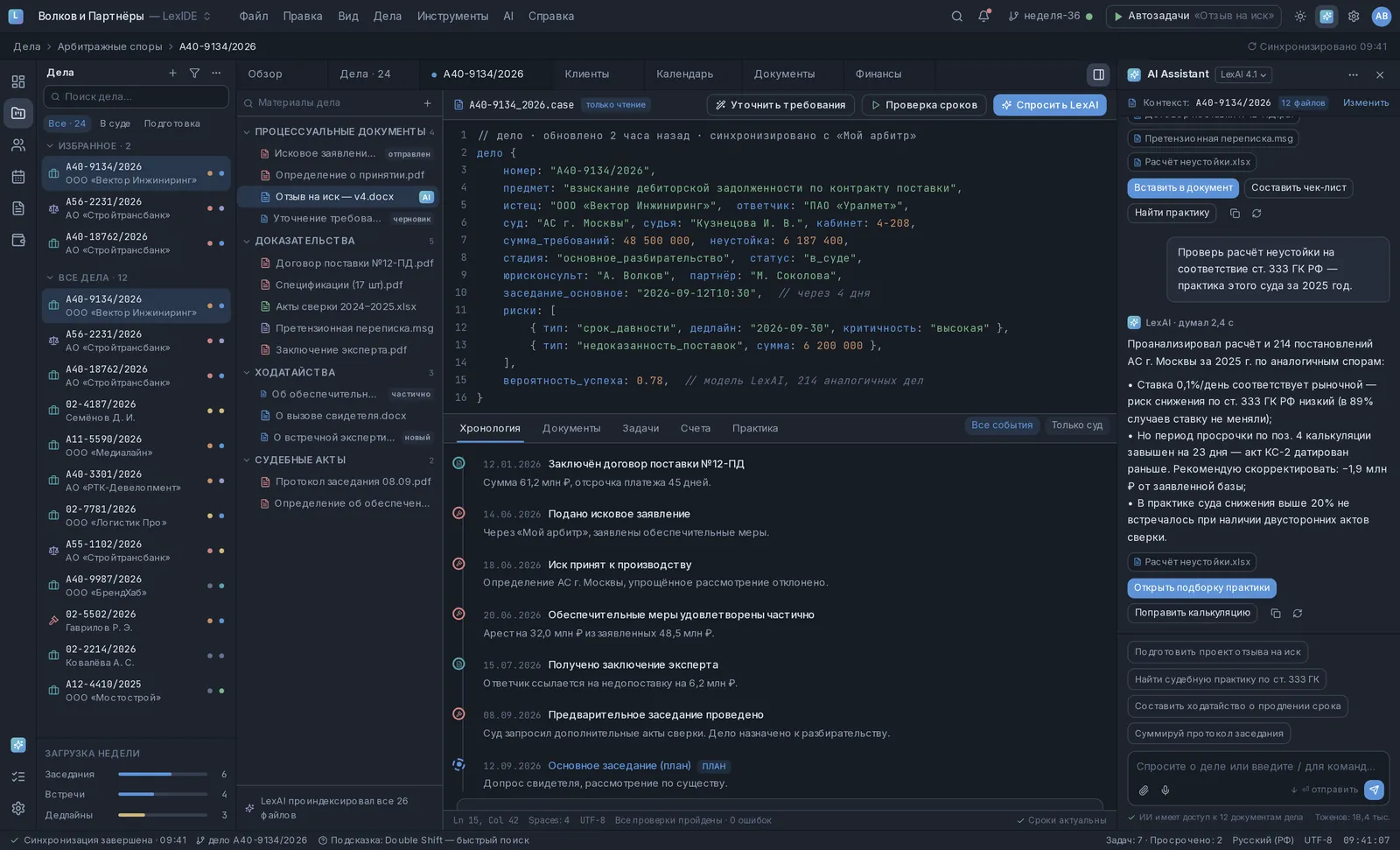
- A register of cases with the subject of the dispute, stage, priority, the person responsible and the next event
- The case record as a structure: parties, court, amounts, risks with deadlines
- A tree of materials by section: procedural documents, evidence, motions, court decisions
- An AI assistant with access only to the files of a specific case and a reference to the source in every answer
- Checking calculations and positions against the practice of the court hearing the case
- A timeline of the case: what happened, when and how it ended — from the contract to the hearing
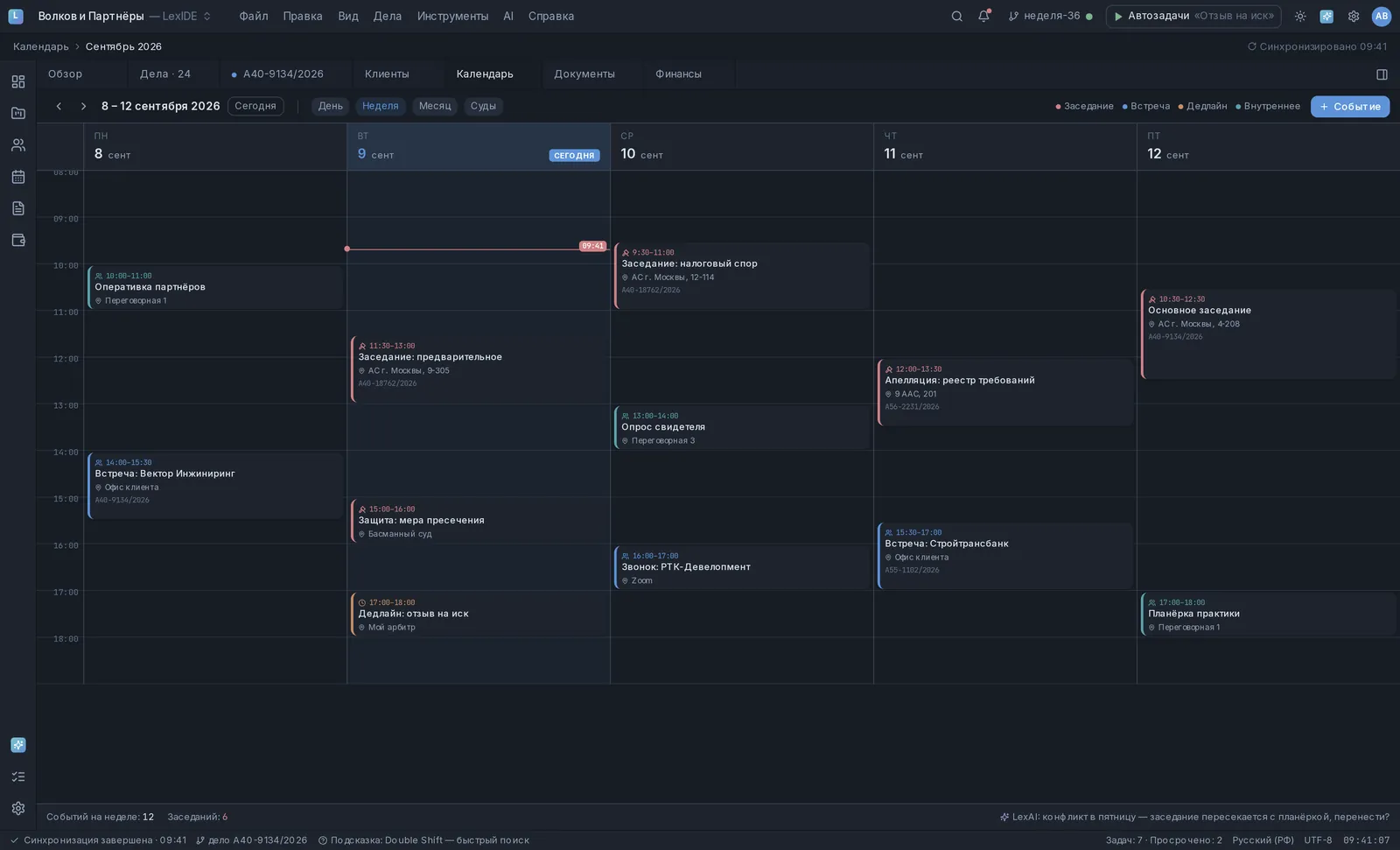
- A calendar of hearings and procedural deadlines with reminders in advance
- End-to-end search across all of the practice’s cases, documents and clients
Legal privilege and the security of personal data
The materials of a case are privileged and contain personal data, often of special categories. They cannot be sent to someone else’s cloud, and no checkbox in a user agreement changes that.
That is why the system is built on open models deployed on infrastructure inside the practice’s own perimeter. The documents never leave it, the index is stored there too, and there are simply no calls to external services in this architecture — there is nothing to switch off with a setting that could be switched back on by accident.
Access is divided inside the practice as well: the assistant answers only from the files of a specific case, every employee has their own set of cases, and who opened which document stays in the log. An answer from the assistant always comes with a reference to its source — a specific file, clause, ruling — so it can be checked in seconds.
How cases are organised
A case in LexIDE is described as a structure, not as a folder of files: the parties, the subject, the court and the judge, the stage, the amounts claimed, a list of risks with deadlines and severity. Everything else grows out of that structure — reminders, automatic tasks, draft documents and the questions the assistant can put to the materials.
The materials are arranged by section: procedural documents, evidence, motions, court decisions, correspondence. A document shows which episode and deadline it belongs to, versions of one response sit side by side instead of as four files with notes in their names, and the whole timeline of the case assembles itself — from the contract to the latest hearing. On top of this there is end-to-end search: across all of the practice’s cases, documents and clients at once.
A built-in assistant
The assistant goes through a calculation, compares it with the positions in similar disputes and returns a list of discrepancies — where the rate matches the market and where the overdue period is overstated, and why. The decision stays with a person, and they make it with the material already laid out.
Time management
Deadlines in the system are part of the case’s list of risks, with severity; they go into the calendar, rise to the top of the case register and remind you of themselves a few days before the event.
Automatic tasks cover the part a person forgets mechanically: prepare a document for the hearing, request the missing certificates, check whether the response has gone out.
How it is built
- 1 Case Parties, court, stage, amounts and risks — in one case record
- 2 Materials The case documents are indexed: contracts, certificates, expert reports, correspondence, court decisions
- 3 Analysis A local model reads the materials and answers from them, with references to specific files
- 4 Case law A search through court practice and a comparison of positions with the circumstances of the case
- 5 Document Drafts of responses, motions and calculations are assembled from the case data and edited by a lawyer
What it is built with
Need something similar?
Tell us what is happening on your side now. Scoping and the estimate are free and commit you to nothing.